Approximately 300 KB transferred
The reported volume for the homepage's initial load. It represents the data transferred during that visit, rather than the total size of every available file.
Technical quality
Accessibility, speed, security and maintenance: see our approach, the results and the limits of each measurement.
We identify obstacles that make it harder to get in touch. Explore the examples, assessment method and recommendations you receive.
For all your customers
Some people use only a keyboard, enlarge text or use a screen reader. We build with them in mind so that more customers can contact you.
If your organisation is covered, its website must meet the applicable accessibility requirements and publish a statement. We help clarify what applies to your project.
In Portugal, websites and mobile applications of public sector bodies covered by Decree-Law No. 83/2018 must meet the applicable accessibility requirements and publish an accessibility statement. A technical assessment should identify the version of European standard EN 301 549 and the requirements applicable to the project.
EN 301 549 sets accessibility requirements for information and communication technology products and services. Its scope goes beyond websites to digital documents, software and other components, depending on the product or service.
For a web project, the assessment should consider the WCAG criteria included in the applicable version of the standard and other relevant requirements. This includes checking content, navigation, forms, published documents and compatibility with assistive technologies.
The AccessMonitor and WAVE results on this page help identify barriers but do not, on their own, demonstrate full compliance with EN 301 549. A compliance conclusion requires assessment of the applicable requirements and documented evidence.
For the Web, version V3.2.1 incorporates WCAG 2.1 Level A and AA criteria, plus additional requirements. Version V4.1.1, published in September 2026, incorporates WCAG 2.2. A new edition does not automatically replace the version referenced in legislation or a contract: each assessment should state the version and framework it uses.
European Commission: standards and web accessibility · Read EN 301 549 V4.1.1 from ETSI (PDF, in English)
Accessibility requirements also apply when a website is used on a mobile device. Content should adapt to small screens and magnification without losing information or functionality, subject to the exceptions in the standards. Screen orientation should not be restricted unnecessarily, and controls should not depend on complex gestures. Contrast, field identification and screen reader compatibility remain essential.
Read the WCAG 2.1 requirements
Usability helps people understand and complete tasks. Accessibility aims to ensure that people with disabilities can also complete those tasks, including people using a keyboard or assistive technology. Assessment should combine automated checks and manual testing.
Read Decree-Law No. 83/2018 (Portuguese) · Explore digital accessibility requirements (Portuguese)
Speed
Lightweight pages, including on mobile.
The reported volume for the homepage's initial load. It represents the data transferred during that visit, rather than the total size of every available file.
The total size of the resources identified in the inventory, including image variants. The browser selects the versions appropriate for the screen; it does not download all of them at once.
Around 90 KiB (92.2 KB), according to WebSitePulse. Website Test downloads the HTML; this is not the size of the full page with images, fonts and styles.
Time recorded by WebSitePulse's Website Test, run from New York. It is not a measurement of the complete page load, nor a guarantee of the same result from another location or connection.
The value shown in WebSitePulse's First Byte field, using that tool's methodology. It should not be confused with the total request time or the time to load the page in a browser.
HTTP test source: WebSitePulse screenshot from , with status OK. Read the transcript of the results. The generic results URL does not identify a permanent historical report.
Time until the main content of our homepage appears.
Laboratory test. Results may vary.
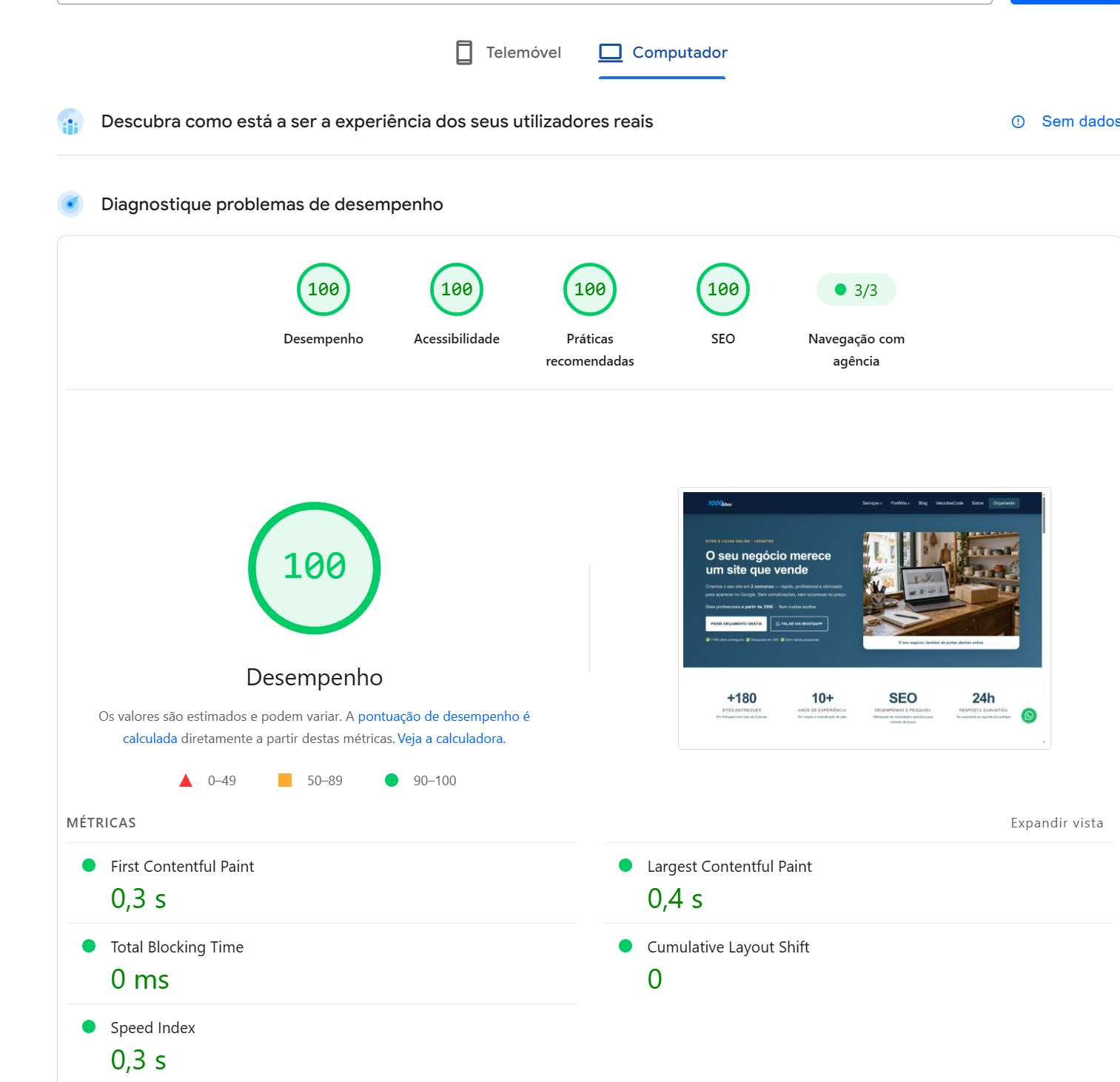
The homepage scored 100 in all four PageSpeed Insights categories on mobile and desktop: performance, accessibility, best practices and SEO.
Main content (LCP): 1.7 s
First contentful paint (FCP): 1.0 s
Total blocking time: 0 ms
Layout shifts (CLS): 0
Main content (LCP): 0.4 s
First contentful paint (FCP): 0.3 s
Total blocking time: 0 ms
Layout shifts (CLS): 0
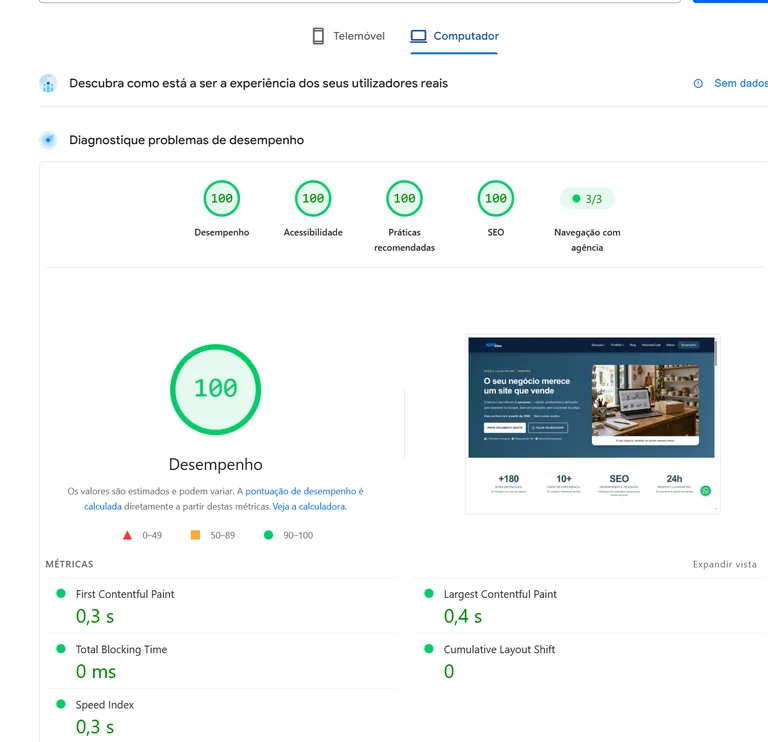
Laboratory test results may vary between runs. The screenshots do not include real user data. The automated accessibility score does not certify that every requirement is met.
Security
A simple structure with the right precautions.
Lower risk does not mean zero risk.
Where a project allows it, we build the website with static HTML and fewer exposed components. The solution depends on your business needs.
Reducing the attack surface does not eliminate all risks. Hosting, the domain, HTTPS, publishing access and backups still need attention.
Forms, stores and restricted areas add their own components. A contact form, for example, uses a service that also needs maintenance and protection. We explain what your project requires.
We choose the architecture to suit the business. Professional HTML websites are an option for suitable projects; an online store or an integration may need a different solution.
Predictable costs
Fewer components to update and fix.
Review security, links, forms, compatibility and hosting. A static website still needs these checks, even without the maintenance of a CMS and its plugins.
Changing services, contact details, prices, images or articles is separate work. Technical simplicity does not remove the need to keep information current and useful.
Transparency
For anyone who wants to verify the figures, we provide reports from the tools used on one of our own websites. They are not a guarantee for other websites: yours is assessed under its own conditions.
| Tool | Indicator measured | Result | Date | Report and source |
|---|---|---|---|---|
| AccessMonitor | Automated accessibility assessment | 10/10; 28 practices, 23 acceptable, five manual checks, zero not acceptable | View the report | |
| Resource inventory | Initial transfer and identified resources | Approximately 300 KB initially; approximately 2 MB across 41 resources, including variants | Record supplied; a public report was not provided. | |
| WebSitePulse · Website Test | HTTP response from New York | 474 ms; First Byte field: 95 ms; response: 92,220 bytes (approximately 90 KiB) | View the screenshot data Learn about the tool | |
| WAVE · WebAIM | Automated homepage accessibility assessment | Zero errors; zero contrast errors; six alerts; AIM Score 9.9/10 | Screenshot shared on ; test date not stated | Read the screenshot transcript · Learn about the tool |
| PageSpeed Insights | Performance, accessibility, best practices and SEO | 100 in all four categories on mobile and desktop; LCP: 1.7 s / 0.4 s; CLS: zero | Screenshots shared on | View results by device and screenshot |
The AccessMonitor link was supplied for viewing the report. The service may show a more recent assessment. The historical figures are those reported in the record for that date; they are neither certification nor a permanent guarantee.
The device, connection, location, cache, page version and tool affect the results. The WebSitePulse screenshot shows separate fields for DNS (59 ms), connection (80 ms), redirects (0 ms), First Byte (95 ms) and Last Byte (241 ms), as well as the total response time of 474 ms. These fields follow the tool's methodology and should not be treated as cumulative times from the start of the request. The screenshot does not identify a separate TLS component.
Accessibility scores should be accompanied by manual testing. A good one-off measurement helps assess the work but does not guarantee the same result on every visit.
PageSpeed Insights results are presented by device, using the figures and screenshot shared on 10 October 2026. They are laboratory tests without real user data.
Tell us what your business needs. We build a website that is fast, easy to use and straightforward to maintain.